Keycloak Cluster Setup
Friday, May 10 2019, posted by 张立强 liqiang@fit2cloud.com
This post shares some solutions to setup Keycloak cluster in various scenarios (e.g. cross-DC, docker cross-host, Kubernetes).
If you'd like to setup Keycloak cluster, this blog may give you some reference.
Two cli script files are added to the Keycloak image as per the guide.
The Dockerfile is below and these two files are the most important matter for this blog, you can find them from TCPPING.cli and JDBC_PING.cli.
FROM jboss/keycloak:latest

ADD cli/TCPPING.cli /opt/jboss/tools/cli/jgroups/discovery/
ADD cli/JDBC_PING.cli /opt/jboss/tools/cli/jgroups/discovery/
First of all we should know that for a Keycloak cluster, all keycloak instances should use same database and this is very simple, another thing is about cache(generally there are two kinds of cache in Keycloaks, the 1st is persistent data cache read from database aim to improve performance like realm/client/user, the 2nd is the non-persistent data cache like sessions/clientSessions, the 2nd is very important for a cluster) which is a little bit complex to configure, we have to make sure the consistent of cache in a cluster view.
Totally here are 3 solutions for clustering, and all of the solutions are base on the discovery protocols of JGroups (Keycloak use Infinispan cache and Infinispan use JGroups to discover nodes).
1. PING
PING is the default enabled clustering solution of Keycloak using UDP protocol, and you don't need to do any configuration for this.
But PING is only available when multicast network is enabled and port 55200 should be exposed, e.g. bare metals, VMs, docker containers in the same host.
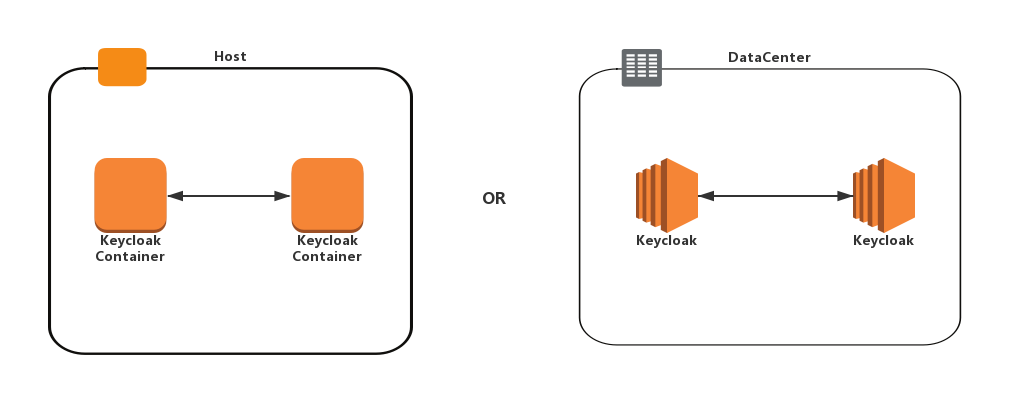
We tested this by two Keycloak containers in same host.
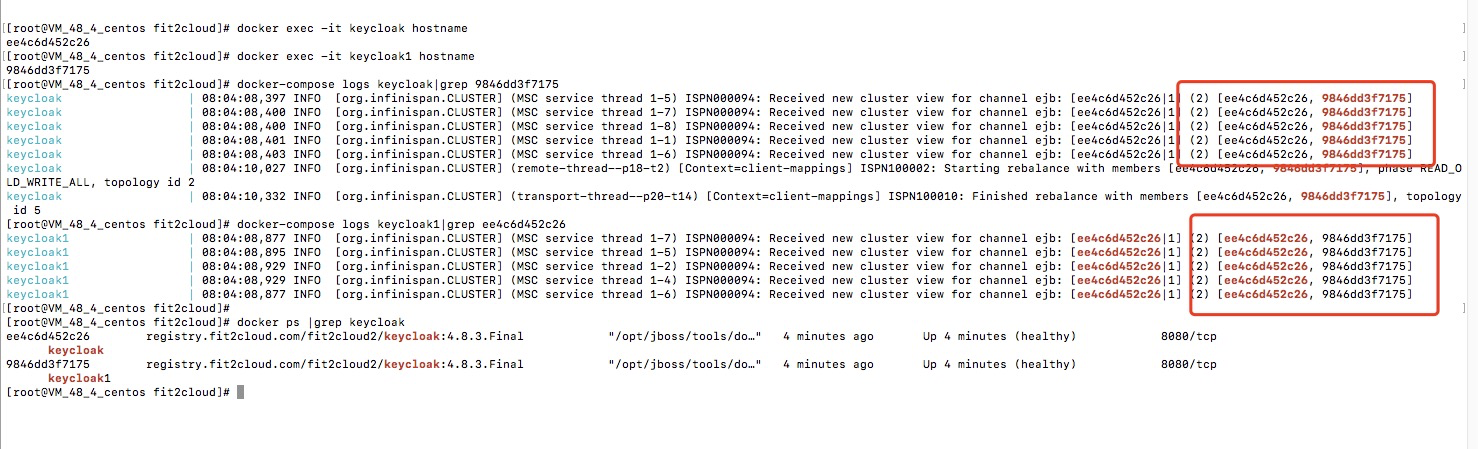
The logs show that the two Keycloak instances discovered each other and clustered.
2. TCPPING
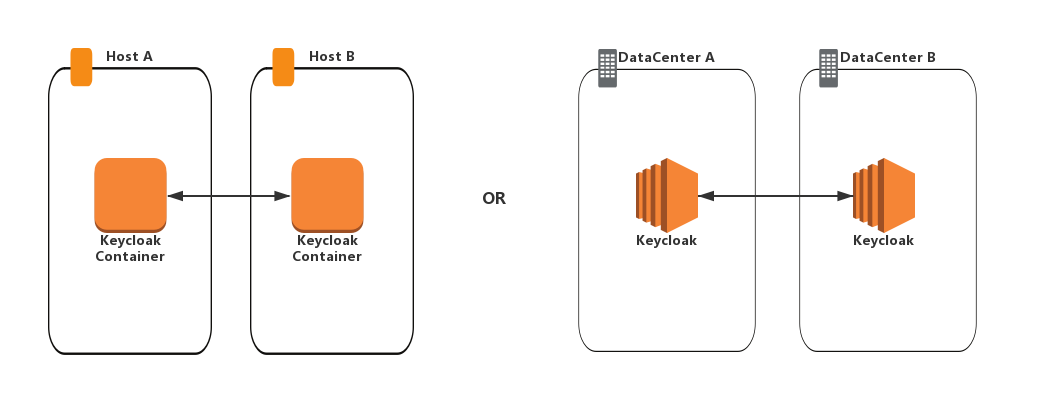
TCPPING use TCP protocol with 7600 port. This can be used when multicast is not available, e.g. deployments cross DC, containers cross host.
We tested this by two Keycloak containers cross host.
And in this solution we need to set three below environment variables for containers.
#IP address of this host, please make sure this IP can be accessed by the other Keycloak instances
JGROUPS_DISCOVERY_EXTERNAL_IP=172.21.48.39
#protocol
JGROUPS_DISCOVERY_PROTOCOL=TCPPING
#IP and Port of all host
JGROUPS_DISCOVERY_PROPERTIES=initial_hosts="172.21.48.4[7600],172.21.48.39[7600]"
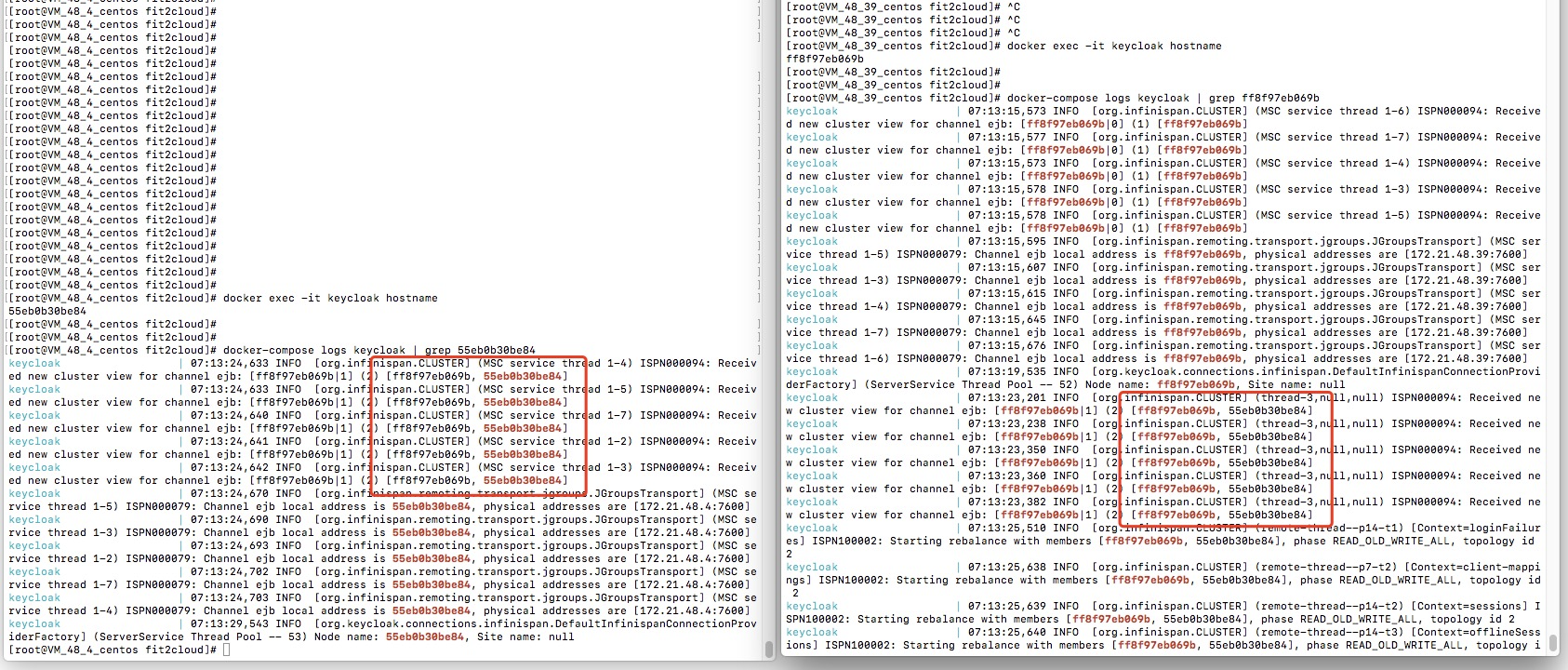
The logs show that the two Keycloak instances discovered each other and clustered.
3. JDBC_PING
JDBC_PING use TCP protocol with 7600 port which is similar as TCPPING, but the difference between them is, TCPPING requires you configure the IP and port of all instances, for JDBC_PING you just need to configure the IP and port of current instance, this is because in JDBC_PING solution each instance insert its own information into database and the instances discover peers by the ping data read from database.
We tested this by two Keycloak containers cross host.
And in this solution we need to set two below environment variables for containers.
#IP address of this host, please make sure this IP can be accessed by the other Keycloak instances
JGROUPS_DISCOVERY_EXTERNAL_IP=172.21.48.39
#protocol
JGROUPS_DISCOVERY_PROTOCOL=JDBC_PING
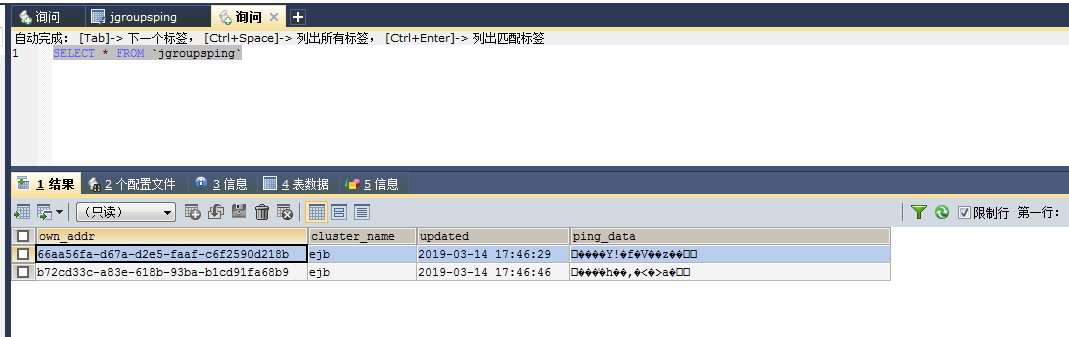
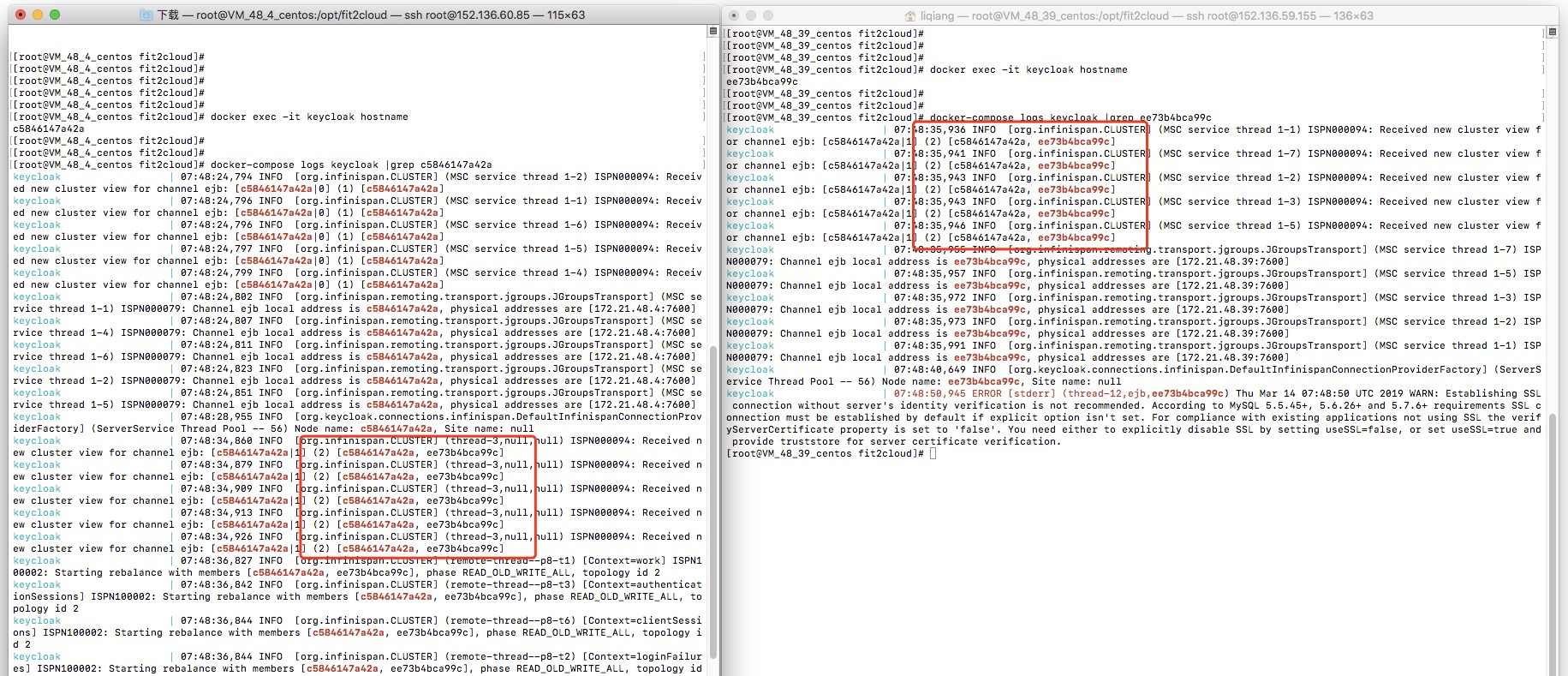
The logs show that the two Keycloak instances discovered each other and clustered.
One more thing
The above solutions are available for most scenarios, but they are still not enough for some others, e.g.Kubernetes.
The typical deployment on Kubernetes is one Deployment/ReplicateSet/StatefulSet contains multi Keycloak Pods, the Pods are really dynamic as they can scale up and down or failover to another node, which requires the cluster to discover and remove these dynamic members.
Besides DNS_PING and KUBE_PING, JDBC_PING is another option for Kubernetes.
On Kubernetes multicast is available only for the containers in the same node and a pod has no static ip which can be used to configure TCPPING or JDBC_PING. But in the JDBC_PING.cli mentioned above we have handled this, if you don't set the JGROUPS_DISCOVERY_EXTERNAL_IP env, the pod ip will be used, that means on Kubernetes you can simply set JGROUPS_DISCOVERY_PROTOCOL=JDBC_PING then your keycloak cluster is ok.
Discussion
Suggestions and comments can be discussed via Keycloak User Mail List or this GitHub Repository.
Nowadays supplying Single Sign On mechanisms becomes more and more important for users convenience. Briefly – single user logged into one system can be automatically logged within other applications used across organization (internally and / or externally). As it is very often used in integration of various systems – reliable operation upon bigger load with good performance of this service becomes important.
Overview
Keycloak supports HA mode to provide this functionality. See https://www.keycloak.org/docs/latest/server_installation/index.html#_standalone-mode. As we provide isolation of our environments by containers working in a cluster distributed across different machines and datacenters – another obstacles come in.
Our Kubernetes cluster setup is multinode, cross server and cross data center, dynamic (from network perspective) installation. This excludes usage of almost every method for discovering cluster members. We cannot assume on which node pod will be scheduled. Also, IP of other Keycloak cluster members (due to dynamic nature of Kubernetes pods) cannot be hardcoded.
This excludes usage of DNS_PING protocol (containers are not on the same host), neither TCP_PING cannot be used. We do not know IP of newly created pods.
We are using Helm chart for provisioning.
Enabling HA in Keycloak chart
Codecentric helm chart used to deploy Keycloak solution to Kubernetes cluster has required value in its values.yaml file:
keycloak :
  replicas: 2
This starts Keycloak in HA mode what we can see i.e. from process list on container

Without any further configuration – due to multinode, cross-vm Kubernetes cluster – this results in loss of ability to login to admin page and a lot of similar errors.
At this moment (May 2019), chart provided by Codecentric has this variable (JDBC_PING) already provided in templates/statefulset.yaml:
{{- if $highAvailability }} | ||
- name: JGROUPS_DISCOVERY_PROTOCOL |
| |
value: "dns.DNS_PING" | ||
Default single node cluster configuration may produce errors given below:
10.123.109.80:7600: BaseServer.TcpConnection.readPeerAddress(): cookie
sent by /10.100.79.133:57980 does not match own cookie; terminating connection
at org.jgroups.blocks.cs.TcpConnection.readPeerAddress(TcpConnection.java:242)
at org.jgroups.blocks.cs.TcpConnection.(TcpConnection.java:53)
at org.jgroups.blocks.cs.TcpServer$Acceptor.handleAccept(TcpServer.java:126)
at org.jgroups.blocks.cs.TcpServer$Acceptor.run(TcpServer.java:111)
Additionally, we’re unable to log in to Admin panel of Keycloak. We are still redirected to login page.
According to https://www.keycloak.org/2019/05/keycloak-cluster-setup.html, in this particular scenario – JDBC_PING protocol can be used.
While pods are starting, their IP’s are used while bootstrapping configuration. Cluster discovery is being conducted, and ID of nodes are added to database. This table does not refresh automatically, and unavailable addresses need to be removed dif ferent way (i.e. before deployment). This shortens time needed for pods to start.

To achieve this method of configuration – JGROUPS_DISCOVERY_PROTOCOL=JDBC_PING environment variable need to be set in extraEnv section, however, this results in another error in logs while starting Keycloak:
10:26:15,505 ERROR [org.jboss.msc.service.fail] (ServerService Thread
Pool -- 52) MSC000001: Failed to start service org.wildfly.clustering.jgroups.channel.ee:
org.jboss.msc.service.StartException in service
org.wildfly.clustering.jgroups.channel.ee: java.lang.IllegalStateException:
java.lang.IllegalArgumentException:
java.security.PrivilegedActionException:
java.lang.IllegalArgumentException: Unrecognized JDBC_PING properties: [dns_query]
We need to change default value of this variable since we are not using DNS_PING discovery protocol. It is defined in statefulset.yaml in Keycloak chart:
- name: JGROUPS_DISCOVERY_PROPERTIES
 value: "dns_query={{ template "keycloak.fullname" . }}-
headless.{{ .Release.Namespace }}.svc.{{ .Values.clusterDomain }}"
{{- end }}
Two options are here, one is to download whole chart and remove this condition, other one is to set this environment variable using our values.yaml in section extraEnv:
- name: JGROUPS_DISCOVERY_PROPERTIES
  value: ""
This value cannot be empty though. Next error will show up:
11:35:57,491 ERROR [org.jboss.msc.service.fail] (ServerService Thread
Pool -- 52) MSC000001: Failed to start service
org.wildfly.clustering.jgroups.channel.ee:
org.jboss.msc.service.StartException in service
org.wildfly.clustering.jgroups.channel.ee:
java.lang.IllegalStateException: java.lang.IllegalArgumentException:
Either the 4 configuration properties starting with 'connection_' or
the datasource_jndi_name must be set
JGroups mechanism need database connection parameters to be provided. Four configuration properties mentioned above include connection string, driver, username and password in plaintext. We can also use datasource_jndi_name which we can get ie. from standalone.xml file from container of single Keycloak instance (replicas set to 1 and JGROUPS_DISCOVERY_PROTOCOL variable removed):
java:jboss/datasources/KeycloakDS
Providing this variable will give us hopefully last error:
12:08:29,323 ERROR [org.jgroups.protocols.JDBC_PING] (ServerService
Thread Pool -- 58) JGRP000138: Error reading JDBC_PING table:
org.postgresql.util.PSQLException: ERROR: relation "jgroupsping" does not exist
As we may assume – we’re missing one table in our database. That is table mentioned on the beginning. It is not provided within Keycloak container out of the box and need to be added manually before service start.
CREATE TABLE IF NOT EXISTS JGROUPSPING (own_addr varchar(200) NOT NULL, cluster_name varchar(200) NOT NULL, ping_data BYTEA, constraint PK_JGROUPSPING PRIMARY KEY (own_addr, cluster_name))
Docker image customization
Additionally, we need to reconfigure Keycloak TCP stack – disable multicast, and use JDBC_PING as default discovery protocol.
Reconfiguration of keycloak server can be done in container. We need to start Wildfly server, provision with file listed below, and stop it.
One way is to provide such CLI configuration in Keycloak container and build it using Docker. Later on such container can be used as image in our values.yaml for Kubernetes deployment.
These steps can be supplied in a wrapper like so
(file standalone-ha-configuration.cli, 3 lines):
(file standalone-ha-configuration.cli, 3 lines):
embed-server --server-config=standalone-ha.xml --std-out=echo
run-batch --file= /opt/jboss/startup-scripts/jgroups-jdbc-ping.cli
stop-embedded-server
standalone-ha-configuration.cli is started in Dockerfile before entrypoint like so (one line):
RUN cd /opt/jboss/keycloak && bin/jboss-cli.sh --
file=/opt/jboss/startup-scripts/standalone-ha-configuration.cli &&
rm -rf
/opt/jboss/keycloak/standalone/configuration/standalone_xml_history
Here is database table and TCP stack reconfiguration file which is executed within keycloak CLI (file jgroups-jdbc-ping.cli)
# Make use of the JDBC_PING
/subsystem=jgroups/stack=tcp:remove()
/subsystem=jgroups/stack=tcp:add()
/subsystem=jgroups/stack=tcp/transport=TCP:add(socket-binding="jgroups-tcp")
/subsystem=jgroups/stack=tcp/protocol=JDBC_PING:add()
/subsystem=jgroups/stack=tcp/protocol=JDBC_PING/property=datasource_jndi_name:add
(value=java:jboss/datasources/KeycloakDS)
/subsystem=jgroups/stack=tcp/protocol=JDBC_PING/property=break_on_coord_rsp:add(value=true)
# Statements must be adapted for PostgreSQL. Additionally, we add a
'creation_timestamp' column.
/subsystem=jgroups/stack=tcp/protocol=JDBC_PING/property=initialize_sql:add
(value="CREATE TABLE IF NOT EXISTS JGROUPSPING (own_addr varchar(200)
NOT NULL, creation_timestamp timestamp NOT NULL, cluster_name varchar(200)
NOT NULL, ping_data bytea, constraint PK_JGROUPSPING PRIMARY KEY (own_addr, cluster_name))")
/subsystem=jgroups/stack=tcp/protocol=JDBC_PING/property=insert_single_sql:add
(value="INSERT INTO JGROUPSPING (own_addr, creation_timestamp, cluster_name, ping_data)
values (?, NOW(), ?, ?)")
/subsystem=jgroups/stack=tcp/protocol=MERGE3:add()
/subsystem=jgroups/stack=tcp/protocol=FD_SOCK:add(socket-binding="jgroups-tcp-fd")
/subsystem=jgroups/stack=tcp/protocol=FD:add()
/subsystem=jgroups/stack=tcp/protocol=VERIFY_SUSPECT:add()
/subsystem=jgroups/stack=tcp/protocol=pbcast.NAKACK2:add()
/subsystem=jgroups/stack=tcp/protocol=UNICAST3:add()
/subsystem=jgroups/stack=tcp/protocol=pbcast.STABLE:add()
/subsystem=jgroups/stack=tcp/protocol=pbcast.GMS:add()
/subsystem=jgroups/stack=tcp/protocol=pbcast.GMS/property=max_join_attempts:add(value=5)
/subsystem=jgroups/stack=tcp/protocol=MFC:add()
/subsystem=jgroups/stack=tcp/protocol=FRAG2:add()
/subsystem=jgroups/channel=ee:write-attribute(name=stack, value=tcp)
/subsystem=jgroups/stack=udp:remove()
/socket-binding-group=standard-sockets/socket-binding=jgroups-mping:remove()
/interface=private:write-attribute(name=nic, value=eth0)
/interface=private:undefine-attribute(name=inet-address)
These steps will result in a working clustered HA configuration of Keycloak in Kubernetes environment. Below established cluster logs are shown (infinispan is in-memory cache which is clustered here automatically):
07:34:46,383 INFO  [org.infinispan.CLUSTER]
(MSC service thread 1-4) ISPN000094: Received new cluster view for channel ejb:
[keycloak-4|6] (5) [keycloak-4, keycloak-2, keycloak-3, keycloak-1, keycloak-0]
07:34:46,383 INFO  [org.infinispan.CLUSTER]
(MSC service thread 1-1) ISPN000094: Received new cluster view for channel ejb:
[keycloak-4|6] (5) [keycloak-4, keycloak-2, keycloak-3, keycloak-1, keycloak-0]
07:34:46,383 INFO  [org.infinispan.CLUSTER]
(MSC service thread 1-3) ISPN000094: Received new cluster view for channel ejb:
[keycloak-4|6] (5) [keycloak-4, keycloak-2, keycloak-3, keycloak-1, keycloak-0]
Here 5 clustered instances are seen. Finally, we are able to log in to Administrator panel too.
Thank you for reading, I hope this knowledge will be useful for you and will help in development of your SSO solution.


No comments:
Post a Comment