4/6/18

Top 10 Testing Frameworks and Libraries for Java Developers

Recently, I have written some articles about what Java developers should learn this year, e.g. programming languages, libraries, and frameworks, but if you have just one thing to improve or learn, then that must be your automation testing skills.

Testing is one of the disciplines that separates professional developers from amateur ones. It's not about following TDD, BDD, or whatever testing methodologies, but at the very minimum level, you must write code to test your code automatically.
Many Java developers write unit tests and integration tests that automatically run during build time, mostly by using continuous integration tools like Jenkins or TeamCity.
If some of you are wondering why a programmer should focus on automation testing, then let me tell you that the importance of automation testing is growing exponentially due to more awareness and emergence of DevOps.
Companies generally prefer programmers who are good at writing unit tests and show good knowledge of various unit testing frameworks, libraries, and tools e.g. JUnitSelenium, REST-Assured, Spock framework, etc.
As a Java developer, we work on very different areas, starts from writing core Java code to creating JSP pages, writing REST APIs, and sometimes even creating Groovy scripts for build automation. That's why we also need to be aware of different tools we can use to automate testing.
For example, I only knew JUnit for a long time, but when I had to test my JSP pages, I was clueless until I found Selenium. Same goes with REST Assured because I usually test my REST API using curl commands, but REST Assured takes the unit testing of REST APIs to another level.

10 Useful Unit and Integration Testing tools for Java Programmers

Since I believe a programmer is as good as their tools, I always try to learn and explore new tools and libraries in my free time, and this list is part of that research.
In this article, I am going to share 10 of the best and essential toolsframeworks, and libraries that can help Java developers writing unit tests and integration tests on their various Java projects.

JUnit

I don't think JUnit needs any introduction. Even if you are a beginner Java programmer, you might have heard about it. It allows you to write unit tests for your Java code.
Almost all major IDEs, e.g. EclipseNetBeans, and IntelliJ, provide JUnit integrations, which means you can both write and run the unit test right from those IDEs.
Most of us are still using JUnit 4, but JUnit 5 is already released and probably the next thing to look at this year. You can use JUnit for both unit and integration testing and it also supports Java 8 features.
best course to learn JUnit 5

REST Assured

Testing and validating REST services in Java is harder than in dynamic languages such as Groovy.
REST Assured brings the simplicity of using these languages into the Java domain. It's a great tool for REST API integration tests.
unit testing tool for REST APIs Java

Selenium

Selenium is probably the most popular tool for Java UI testing, which allows you to test your JSP pages without launching them in a browser.
You can test your web application UI using JUnit and Selenium. It even allows you to write web application acceptance tests.
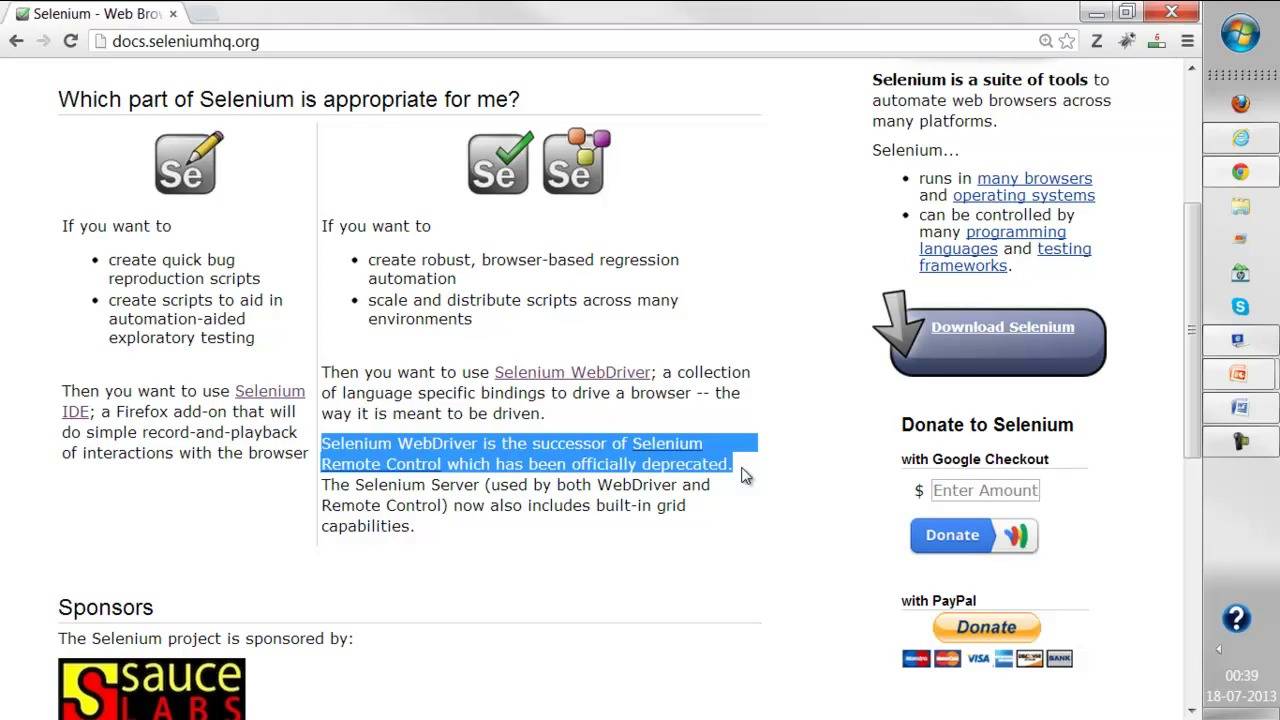
Image title

TestNG

TestNG is a testing framework inspired by JUnit and NUnit but introducing many new functionalities that make it more powerful and easier to use, such as annotations, running your tests in arbitrarily big thread pools with various policies available (all methods in their own thread, one thread per test class, etc).
The gap between JUnit and TestNG has reduced because of using annotations from JUnit 4 and integrating the Hamcrest matchers as well but it's up to you.
How to learn TestNG in Java

Mockito

There are many mocking frameworks for Java classes, e.g. PowerMock and JMock, but I personally like Mockito for their simple API, great documentation, and lots of examples.
Mocking is one of the essential techniques of modern-day unit testing, as it allows you to test your code in isolation without any dependency, and that's why I encourage every Java developer to learn a mocking framework along with JUnit.
My favorite mocking framework is Mockito, but if you like, you can also explore PowerMock or JMock.

Spock Framework

Spock is another testing and specification framework for Java and Groovy applications. It's written in Groovy, which makes it a very expressive and to-the-point specification language.
When you use Spock, your test will become more readable and easier to maintain and thanks to its JUnit runner, Spock is compatible with most IDEs, build tools, and continuous integration servers.
Unfortunately, I didn't find a useful course to learn Spock framework but Java Testing with Spock book is a good resource to start with.
book to learn Spock Framework

Cucumber

Cucumber is another great tool for automated integration tests, but what makes it different from other tools in the same category is its specification capability.
Cucumber merges specification and test documentation into one cohesive whole living documentation and since they will be automatically tested by Cucumber, your specifications are always banged up-to-date.
best integration tool for Java applications

Spring Test

Spring MVC comes with a very useful test framework that allows doing in-depth testing without even involving a web container.
It is one of the most useful libraries for writing automated tests to Spring applications. It provides a first-class support for writing unit and integration tests to Spring-powered applications, including MVC controllers.
There is also a Spring Test DbUnit that integrates the Spring Test framework with DbUnit and a Spring Test MVC HtmlUnit, which integrates the Spring Test MVC framework with HtmlUnit.
By using these tools you can easily test your Spring MVC application in an automated way.

DBUnit

A database is an integral part of many Java applications, both core Java and web applications, and probably the biggest obstacle while doing unit testing.
It's not reliable to connect to Dev or UAT databases for integration tests because anyone can change the data and schema, e.g. tables and stored procedures, and that will cause your automated integration tests to fail.
DbUnit is a JUnit extension that can be used to initialize the database into a known state before each integration test to ensure that the database contains the correct data.
DbUnit has its own issues, but it is a very useful tool because it helps us to separate the test data creation from the tested code.

unit testing tool for database code

Robot Framework

The Robot Framework is a Python-based generic test automation framework for acceptance testing and acceptance test-driven development.
It is a keyword-driven testing framework that uses tabular test data syntax. You can use it to test distributed, heterogeneous applications, where verification requires touching several technologies and interfaces.
If you decide to learn this wonderful framework for integration test, then Udemy's Robot Framework Test Automation is a great resource to start with.
It's a two-part course which covers the basic and advanced features of Robot framework.
integration testing tools for Java developers

Conclusion

That's all about some of the essential unit testing and integration testing tools, frameworks, and libraries for Java developers.
There are many more libraries that I have not included in this list, e.g. AssertJ and Hamcrest, which can help you to write beautiful and fluent tests — but take things slowly.
To start with, learn a tool or library that you can use in your day-to-day work. For example, if you are working with Java UIs, then you should first learn Selenium because then you can focus on this tool more.
Similarly, if you are working on REST APIs then learn REST Assured (See REST with Spring). If you are doing a lot of core Java work, then JUnit 5 is probably the first library you should look at.

3/2/18

OAuth Access Tokens or JSON Web Tokens (JWT) for Delivering a Secure API?

Let’s begin with what they mean.
First of all, it's not really an either or scenario with OAuth and JSON Tokens as they are compatible - wherein JWT is a token format used by the authentication framework, OAuth.
JWT is a compact and self-contained mechanism, digitally authenticated and trusted, for transmitting data between various parties. They are extremely easy to use and are mainly used for implementing stateless authentication mechanisms.
OAuth 2 offers authorization flows for Java application development, along with mobile devices. It works with a central authorization server, which is used by the client to obtain access to a protected resource placed on the server. The access is only possible using a valid access token issued in the form of JSON – but it has no definitive structure assigned to it. OAuth 2.0 defines a protocol for passing your access token within the Authorization header. The resource server validates the signature using the following information:
  • Client
  • Lifetime
  • Scopes
  • Roles

Similarities

  • Token Presentation to the server: JWT authentication and OAuth2 appear very similar in presenting the token to the Resource Server. However, the former does not specify the methods used to obtain the token. This is where OAuth fills the void by defining various ways in which the Client can obtain an access token from the Authorization Server.
  • Used across services: Both JWT and OAuth2 give you one authorization server to handle all Logins/Registrations and generates the token – making it easy for corporate systems to have a secure environment. It removes all connections between auth-server and other servers, other than the pre-defined public key.

Differences

JSON is less verbose, which makes it compact in size. It becomes a better choice to be used in HTML and HTTP environments. The use of JWT at Internet scale increases the ease of client-side processing of tokens on various platforms simultaneously.

Why Should We Use OAuth2?

OAuth2 aims to simplify authorization to access protected data. It allows you access your data but protects the owner’s account credentials in the process. It allows the user to access data from one web account to the other by simply giving out tokens, instead of credentials. The token grants access to certain specific resources for a specific duration, which can be shared with a third party. This temporary data transfer authorization is done without providing anyone with complete access to all the data. Users can share verifiable assertions about themselves using OAuth2, without releasing personally identifiable information.

Cons of OAuth2:

OAuth2 protocol requires a secret string obtained from the service to be delegated. Developers find it difficult to manage this string on mobile devices, as it can be easily found in the application and misused.

Cons of JWT:

Compromised Secret Key: The one key method makes it slightly less reliable. If the Key is leaked, it compromises the whole system.
No Push Messages: Due to the lack of session records in the DB, identifying a client per user is not possible – hence, we cannot push messages.

Conclusion:

Using OAuth2 setup for authenticating multiple API platforms and applications, both in both public and private settings is a much more sensible way of doing things. JSON web tokens can work as your bearer tokens here and make life easier.

2/28/18

HTTP endpoint to shut down a spring boot

Maven quick example for maven user to configure HTTP endpoint to shut down a spring boot web app using spring-boot-starter-actuator so that you can copy and paste:
1. Maven pom.xml:
<dependency>
    <groupId>org.springframework.boot</groupId>
    <artifactId>spring-boot-starter-actuator</artifactId>
</dependency>

2. application.properties:
#NEED auth  protected 
endpoints.shutdown.sensitive=true

#Enable shutdown endpoint
endpoints.shutdown.enabled=true
All endpoints are listed here:
3.Send a post method to shutdown the app:
curl -X POST localhost:port/shutdown

Security Note:

if you need the shutdown method auth protected, you may also need
<dependency>
  <groupId>org.springframework.boot</groupId>
  <artifactId>spring-boot-starter-security</artifactId>
</dependency>

management.security.enabled=true
security.user.name=admin
security.user.password=secret
management.security.roles=SUPERUSER

[Evolution] Error resolving 'outlook.office365.com': Name or service not known

Check below config to fix this bug:

$ cat /etc/resolv.conf
nameserver 127.0.1.1
multi on
order hosts,bind


$ cat /etc/nsswitch.conf
passwd:         compat
group:          compat
shadow:         compat
gshadow:        files

hosts:          files dns
networks:       files

protocols:      db files
services:       db files
ethers:         db files
rpc:            db files

netgroup:       nis

2/26/18

HP EliteBook 840 G4

System:    Host: dqvnHP Kernel: 4.13.0-32-generic x86_64 (64 bit gcc: 5.4.0)
           Desktop: Cinnamon 3.6.7 (Gtk 3.18.9-1ubuntu3.3) dm: lightdm Distro: Linux Mint 18.3 Sylvia
Machine:   System: HP (portable) product: HP EliteBook 840 G4 Chassis: type: 10
           Mobo: HP model: 828C v: KBC Version 45.3C Bios: HP v: P78 Ver. 01.08 date: 10/17/2017
CPU:       Dual core Intel Core i7-7500U (-HT-MCP-) cache: 4096 KB
           flags: (lm nx sse sse2 sse3 sse4_1 sse4_2 ssse3 vmx) bmips: 11616
           clock speeds: min/max: 400/3500 MHz 1: 2900 MHz 2: 2900 MHz 3: 2900 MHz 4: 2900 MHz
Graphics:  Card: Intel Device 5916 bus-ID: 00:02.0 chip-ID: 8086:5916
           Display Server: X.Org 1.18.4 drivers: intel (unloaded: fbdev,vesa)
           Resolution: 1920x1080@60.01hz, 1920x1080@60.00hz
           GLX Renderer: Mesa DRI Intel HD Graphics 620 (Kaby Lake GT2)
           GLX Version: 3.0 Mesa 17.2.8 Direct Rendering: Yes
Audio:     Card Intel Device 9d71 driver: snd_hda_intel bus-ID: 00:1f.3 chip-ID: 8086:9d71
           Sound: Advanced Linux Sound Architecture v: k4.13.0-32-generic
Network:   Card-1: Intel Ethernet Connection (4) I219-V
           driver: e1000e v: 3.2.6-k bus-ID: 00:1f.6 chip-ID: 8086:15d8
           IF: enp0s31f6 state: up speed: 1000 Mbps duplex: full mac: 
           Card-2: Intel Device 24fd driver: iwlwifi bus-ID: 02:00.0 chip-ID: 8086:24fd
           IF: wlp2s0 state: up speed: N/A duplex: N/A mac: 
Drives:    HDD Total Size: NA (-) ID-1: /dev/nvme0n1 model: N/A size: 256.1GB serial: N/A
Partition: ID-1: / size: 92G used: 35G (40%) fs: ext4 dev: /dev/nvme0n1p2
           ID-2: swap-1 size: 16.00GB used: 0.00GB (0%) fs: swap dev: /dev/dm-0
RAID:      System: supported: N/A
           No RAID devices: /proc/mdstat, md_mod kernel module present
           Unused Devices: none
Sensors:   System Temperatures: cpu: 39.0C mobo: 0.0C
           Fan Speeds (in rpm): cpu: N/A
Repos:     Active apt sources in file: /etc/apt/sources.list.d/chrome.list
           deb [arch=amd64] http: //dl.google.com/linux/chrome/deb/ stable main
           Active apt sources in file: /etc/apt/sources.list.d/official-package-repositories.list
           deb http: //packages.linuxmint.com sylvia main upstream import backport
           deb http: //archive.ubuntu.com/ubuntu xenial main restricted universe multiverse
           deb http: //archive.ubuntu.com/ubuntu xenial-updates main restricted universe multiverse
           deb http: //archive.ubuntu.com/ubuntu xenial-backports main restricted universe multiverse
           deb http: //security.ubuntu.com/ubuntu/ xenial-security main restricted universe multiverse
           deb http: //archive.canonical.com/ubuntu/ xenial partner
           Active apt sources in file: /etc/apt/sources.list.d/peterlevi-ppa-xenial.list
           deb http: //ppa.launchpad.net/peterlevi/ppa/ubuntu xenial main
           deb-src http: //ppa.launchpad.net/peterlevi/ppa/ubuntu xenial main
           Active apt sources in file: /etc/apt/sources.list.d/skype-stable.list
           deb [arch=amd64] https: //repo.skype.com/deb stable main
           Active apt sources in file: /etc/apt/sources.list.d/stebbins-handbrake-git-snapshots-xenial.list
           deb http: //ppa.launchpad.net/stebbins/handbrake-git-snapshots/ubuntu xenial main
           deb-src http: //ppa.launchpad.net/stebbins/handbrake-git-snapshots/ubuntu xenial main
           Active apt sources in file: /etc/apt/sources.list.d/webupd8team-java-xenial.list
           deb http: //ppa.launchpad.net/webupd8team/java/ubuntu xenial main
           deb-src http: //ppa.launchpad.net/webupd8team/java/ubuntu xenial main
Info:      Processes: 261 Uptime: 4 days Memory: 7697.3/15920.6MB
           Init: systemd v: 229 runlevel: 5 default: 2 Gcc sys: 5.4.0
           Client: Unknown python2.7 client inxi: 2.2.35