5/31/13

Download the additional transitive dependencies of the modules from maven pom.xml

The obvious answer is to suggest that you consider building your code using Maven. This will give you native support for the Maven Central repository.
But... I sense that you just want to download the files you need to a local directory? In that case I'd suggest using the Apache ivy command-line.

Example

The files you want are listed in a ivy.xml file. For example:
<ivy-module version="2.0" xmlns:e="http://ant.apache.org/ivy/extra">
    <info organisation="com.myspotontheweb" module="demo"/>

    <dependencies>
        <dependency org="commons-lang" name="commons-lang" rev="2.6" conf="default"/>
        <dependency org="junit" name="junit" rev="4.10" conf="default"/>
    </dependencies>

</ivy-module>
And ivy can populate a local "lib" directory as follows:
java -jar ivy-2.3.0.jar -ivy ivy.xml -retrieve "lib/[artifact]-[revision].[ext]"

The advantage of this approach is that ivy can download the additional transitive dependencies of the modules you've specified:
$ find lib -type f
lib/commons-lang.jar
lib/junit.jar
lib/hamcrest-core.jar
Note:
  • hamcrest-core is a depedency of junit.

5/23/13

How to read Android apk contents


How to read Android apk contents

Lets say you want to read the contents of an android apk file.

Why?
Maybe it's yours and you want to be sure of the version, maybe you want to see if the code in that apk contains the latest feature you inserted. Or maybe it isn't your code but you want to check something with someone else's code (without breaking any license etc).

In a nutshell - What are the steps one should take in order to explore an apk file?

1. Only read the manifest contents of an apk:
Use the following command (make sure you have aapt.exe and the apk file on your path):
aapt dump badging XXYY.apk

[Later Edit] 1.5 You want to change some resources of the apk using a nice GUI
Try APK Edit - It will enable you to do the following:

  • Change icons of your android application.
  • Change the applications name.
  • Edit the localized text (Strings.xml) used in applications.

2. You want to read all of the apk's contents:
Method A. Use the following tool: apktool (apktool d filename.apk) [It will generate .smali files instead of class files though, you can add the "-s" option tag in order to get the classes.dex instead of the *.smali files].
(A GUI exists: apktool gui but it seems buggy, later versions can be found but they aren't localized to English yet - as of the time of editing this post)
Method B. 
* Rename the apk file to .zip (instead of .apk) and extract the contents as you extract a zip file.
* The contents are yours for the taking now - except for the class files, in order to see the actual java code, use the following tool on the *.dex file: dex2jar
* In order to read the contents of the jar file (containing the java class files) use a decompiling tool: JD-Gui


Now any apk is open like a book!


[Later Edit] I found this super tool which I must recommend: Apk Multi Tool (Previous name was apk manager)


  • Install this tool
  • Goto it's directory and copy your apk to the following folder: "place-apk-here-for-modding"
  • Run it
  • Click on: 1 (will extract the apk)
  • Now edit the apk as you wish (change images etc)
  • Click on 3 to zip it
  • Click on 4 to sign it.


That's it - you have just changed a working apk and retained it's signature.


[Latest Edit] Some utils which are worth following:
Androidsuite - Gui which envelopes several command line utils, enables the following:

  • Decodes and encodes Dex files
  • Decodes and encodes APK files
  • Sign unsigned apks

(Current version doesn't work for me)

APKInspector - Gui with so many features, so instead of writing them down I'll send you to this amazing video of theirs:
http://www.youtube.com/watch?v=X538N-x3UUY

Well, the main problem with this tool is that you can install it only on a linux machine and have to install several other dependencies, I'll continue to follow it though and if they will release a windows version (I don't think they ever will though) I will update this post

5/17/13

Java Decompiler

http://java.decompiler.free.fr/

Introduction

The “Java Decompiler project” aims to develop tools in order to decompile and analyze Java 5 “byte code” and the later versions.
JD-Core is a library that reconstructs Java source code from one or more “.class” files. JD-Core may be used to recover lost source code and explore the source of Java runtime libraries. New features of Java 5, such as annotations, generics or type “enum”, are supported. JD-GUI and JD-Eclipse include JD-Core library.
JD-GUI is a standalone graphical utility that displays Java source codes of “.class” files. You can browse the reconstructed source code with the JD-GUI for instant access to methods and fields.
JD-Eclipse is a plug-in for the Eclipse platform. It allows you to display all the Java sources during your debugging process, even if you do not have them all.
JD-Core, JD-GUI and JD-Eclipse are free for non-commercial use. This means that JD-Core, JD-GUI and JD-Eclipse shall not be included or embedded into commercial software products. Nevertheless, these projects may be freely used for personal needs in a commercial or non-commercial environments.

5/13/13

Talend Open Studio: Scheduling and command line execution


Talend Open Studio: Scheduling and command line execution


Talend Open Studio: Scheduling and command line execution

In this tutorial we will take a look at how to export a Talend Open Studio ETL job to an autonomous folder and schedule the job via crontab. In order to follow this tutorial, the reader should be familiar with the basic functionality of Talend Open Studio for Data Integration.


How to export a job


Right click on your job and choose Export job.


In the export settings define:
  • the export folder and file name
  • the Job Version
  • set the Export type to Autonomous Job
  • tick Export dependencies
  • define the Context and tick Apply to children
Click on Finish and your job will be exported.


How to execute the job from the command line


Navigate to the folder where the zip file was exported to and unzip it. Then navigate to:


_/

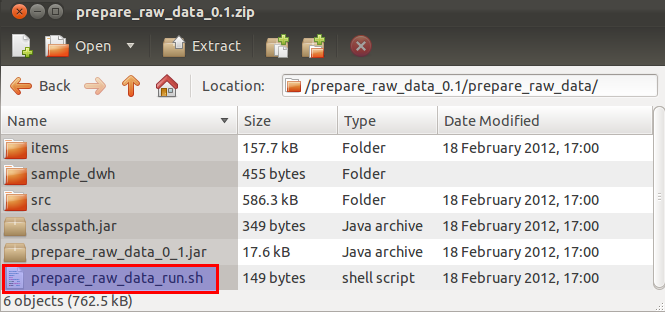
Within this folder you will find an executable shell and/or batch file:


Open this file in a text editor:


Note that the context is defined as a command line argument. It is currently set to the value which you specified on export, but you can change it any time to another value here.

To execute the job on the command line simply navigate to this folder and run:
sh ./_run.sh


How to execute a job with specific context variables

As you might have guessed, the approach is very similar to the one shown above, we just add command line arguments:

sh ./_run.sh --context_param variable1=value1 --
context_param variable2=value2


How to change the default context variables

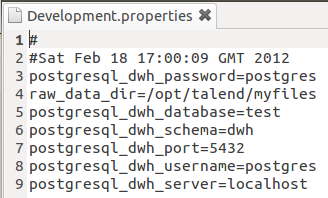
If you ever need to change the value of any of your context variables, you can find the property file for each context in:

_///_/contexts/

Which in my case is:

Open one of them to understand how they are structured:

As you can see it is extremely easy to change these values.


How to schedule a job

If you make use of context variables regularly, then it is best to include them directly in the *_run.sh or *_run.bat file. Just open the file with your favourite text editor and add the variables after the context argument similar to this one:
Ideally though, especially if you are dealing with dates, you want to make this more dynamic, like this one:
On Linux use Crontab to schedule a job:

crontab -e

And then set it up similar to the one shown below:

On Windows you can use the Windows Scheduler. As this one has a GUI, it is quite straight forward to set it up and hence will not be explained here.

5/9/13

Unicode for Talend Open Studio (Data Integration)

LInk from http://www.talendforge.org/forum/viewtopic.php?id=12771
Firstly, I would like to say hello. I am new to the forums and new to Talend.
I have been encountering a problem, and I am unsure if something is wrong or if I have missed a step.
I need export data from Excel to MySQL. The part data contain Russian characters.

Tracert in inside TOS - all look well.

Result in table of MySql is wrong.   


problem solving - need pass the jdbc parameter to force utf8 encoding "noDatetimeStringSync=true&characterEncoding=utf8"