


I’m a software engineer at Panya Studios where we’re moving to a microservices architecture — and the first service that we created is for our real-time chat system.
As part of creating this new service, we’ll be storing our chat data for analytics. While seemingly simple, this effort required us to pause and consider the following question:
“How can we efficiently read and write chat data?”
With over a million users and counting, our chat database can grow really big and really fast — so it’s all about scalability. In response, the answer is partitioning!

Some basic definitions
Before we get started, here’s a few basic terms.
- Partitioning refers to splitting a large table into smaller tables.
- Dynamic refers to constantly changing.
- Dynamic Partitioning thus refers to automatically splitting a large table into smaller tables.
Now that we’re on the same page, let’s go more in depth on how we can achieve dynamic partitioning with PostgreSQL!
PostgreSQL
PostgreSQL is a powerful, open source object-relational database system that uses and extends the SQL language combined with many features that safely store and scale the most complicated data workloads. https://www.postgresql.org/about/
One of the many features that PostgreSQL supports is table partitioning. In fact, they have a great post about partitioning which I highly encourage you to read.
Although the examples they provided are hard coded, their documentation is excellent and contains the core features of partitioning:
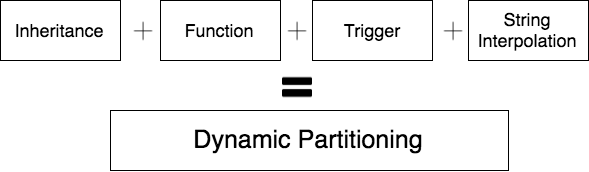
- Inheritance
- Functions
- Triggers
The last item to make this truly dynamic is string interpolation! Combine the four features together, and you get . . . dynamic partitioning!

TLDR; Show me the code!
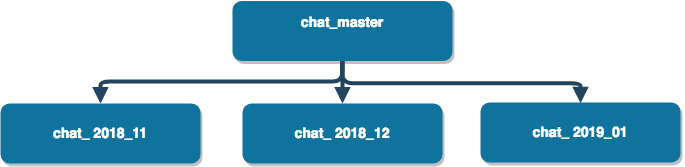
Our goal is to automatically achieve the creation of new partitions each month — instead of manually creating each one ahead of time.

Here’s how to create dynamic partitioning in 3 simple steps.
Step #1 — Create the parent table
-- number generator for id
CREATE SEQUENCE chat_id_seq;

CREATE TABLE public.chat_master
(
    id integer NOT NULL DEFAULT nextval('chat_id_seq'::regclass),
    program_id character varying COLLATE pg_catalog."default",
    user_id character varying COLLATE pg_catalog."default",
    dialogue character varying(10000) COLLATE pg_catalog."default",
    created_at timestamp without time zone
)
TABLESPACE pg_default;


CREATE INDEX idx_program_id
    ON public.chat_master USING hash
    (program_id COLLATE pg_catalog."default")
    TABLESPACE pg_default;

CREATE INDEX idx_user_id
    ON public.chat_master USING hash
    (user_id COLLATE pg_catalog."default")
    TABLESPACE pg_default;

CREATE INDEX idx_created_at ON public.chat_master ((created_at::DATE));
Step #2 — Create the function
CREATE OR REPLACE FUNCTION chat_insert_function()
RETURNS TRIGGER AS $$
DECLARE
 partition_date TEXT;
 partition_name TEXT;
 start_of_month TEXT;
 end_of_next_month TEXT;
BEGIN
 partition_date := to_char(NEW.created_at,'YYYY_MM');
  partition_name := 'chat_' || partition_date;
 start_of_month := to_char((NEW.created_at),'YYYY-MM') || '-01';
 end_of_next_month := to_char((NEW.created_at + interval '1 month'),'YYYY-MM') || '-01';
IF NOT EXISTS
 (SELECT 1
     FROM   information_schema.tables
     WHERE  table_name = partition_name)
THEN
 RAISE NOTICE 'A partition has been created %', partition_name;
 EXECUTE format(E'CREATE TABLE %I (CHECK ( date_trunc(\'day\', created_at) >= ''%s'' AND date_trunc(\'day\', created_at) < ''%s'')) INHERITS (public.chat_master)', partition_name, start_of_month,end_of_next_month);
 -- EXECUTE format('GRANT SELECT ON TABLE %I TO readonly', partition_name); -- use this if you use role based permission
END IF;
EXECUTE format('INSERT INTO %I (program_id, user_id, dialogue, created_at) VALUES($1,$2,$3,$4)', partition_name) using NEW.program_id, NEW.user_id, NEW.dialogue, NEW.created_at;
RETURN NULL;
END
$$
LANGUAGE plpgsql;
I’ll try my best to explain what’s going on:
- First we CREATE a new FUNCTION called “chat_insert_function()”
- Then we DECLARE the variables that will be used
- Afterwards we BEGIN initializing the variables
- Next we query to see if the partitioned table exists. If not, we dynamically create a new partitioned table e.g. (chat_yyyy_mm) that INHERITS from chat_master.
- Finally, we insert the new record to the partitioned table
Some things to note:
- The parent table is always empty.
- “NEW” signifies a new database row for INSERT/UPDATE operations
- Tables cannot contain dash (-), so table names are underscored (_)
- “||” is PostgreSQL syntax for string concatenation
- For STRING INTERPOLATION, we use the built-in function “format()”
- The syntax for escape string is backslash (\), but the letter ‘E’ has to come before the opening single quote — see line 19.
- RETURN NULL means that this function returns nothing to the caller, which is the TRIGGER.
Step #3 — Create the trigger
CREATE TRIGGER insert_chat_trigger
    BEFORE INSERT ON public.chat_master
    FOR EACH ROW EXECUTE PROCEDURE public.chat_insert_function();
To put it simply, this trigger will fire chat_insert_function() before every insert into chat_master — thereby redirecting the NEW records inserted into its respective partitioned table.
Querying the data
Now that we’ve created a script that would dynamically create partitions when new records get inserted — what about READing from them?
Good question! In order to test this, we must first INSERT a new row into chat_master.
INSERT statement
INSERT INTO public.chat_master (
 program_id, user_id, dialogue, created_at)
 VALUES ('program_1', 'A01', 'hello world!', '2018-11-11'
);
Assuming that you followed the previous steps to create the parent table, function, and trigger, you should see the results as
NOTICE:  A partition has been created chat_2018_11
INSERT 0 0
If you refresh your tables, you should see a new one “chat_2018_11” with the same columns as chat_master.
SELECT statementNow that we have some data stored in our database, we can SELECT from them.
SELECT * FROM chat_master|id | program_id  |user_id|   dialogue     | created_at
-----------------------------------------------------------------
| 2 | "program_1" | "A01" | "hello world!" | "2018-11-11 00:00:00"
We can also SELECT directly from the partitioned table
SELECT * FROM chat_2018_11|id | program_id  |user_id|   dialogue     | created_at
-----------------------------------------------------------------
| 2 | "program_1" | "A01" | "hello world!" | "2018-11-11 00:00:00"
Wait a second ... isn’t this duplicate data?
Nope! That’s what I thought at first too, but this isn’t the case. When you’re inserting data into chat_master, it’s only writing to the partitioned table. However, when you’re reading from chat_master, it’s grabbing data from all the inherited partitioned tables.
Let me illustrate this concept with the following queries:
INSERT INTO public.chat_master (
 program_id, user_id, dialogue, created_at)
 VALUES ('program_2', 'A01', 'hello panya!', '2018-12-12'
);NOTICE:  A partition has been created chat_2018_12
INSERT 0 0
SELECT * FROM chat_master|id | program_id  |user_id|   dialogue     | created_at
-----------------------------------------------------------------
| 2 | "program_1" | "A01" | "hello world!" | "2018-11-11 00:00:00"
| 3 | "program_2" | "A01" | "hello panya!" | "2018-12-12 00:00:00"SELECT * FROM chat_2018_12|id | program_id  |user_id|   dialogue     | created_at
-----------------------------------------------------------------
| 2 | "program_2" | "A01" | "hello panya!" | "2018-12-12 00:00:00"
You can also run the following command to verify that chat_master is empty
SELECT * FROM ONLY chat_master
Why Partitioning Matters
Dynamic partitioning is great when you want to automatically split a large table into smaller ones. This can be beneficial when running full table scans and filtering by the partitions on the WHERE clause.
Dynamic partitioning is also more efficient than executing bulk database operations — for example, drop the partition table instead of bulk deletes. By implementing dynamic partitioning on large tables, you might see improvements in your database query performance, maintainability, and scalability.
Try giving partitioning a shot! If you have another way of doing this or you have any problems with examples above, just drop a comment below to let me know.
Thanks for reading — and please follow me here on Medium for more interesting software engineering articles!


No comments:
Post a Comment