ASP.NET CORE 1.0 WITH MYSQL AND ENTITY FRAMEWORK CORE
2016.12.01: Updated to ASP.NET Core 1.1
Thanks to Noah Potash for creating this example and adding his code to this code base.
The Entity Framework MySQL package can be downloaded using the NuGet packageSapientGuardian.EntityFrameworkCore.MySql. At present no official provider from MySQL exists for Entity Framework Core which can be used in an ASP.NET Core application.
The SapientGuardian.EntityFrameworkCore.MySql package can be added to the project.json file.
1
2
3
4
5
6
7
8
9
10
11
12
13
14
15
16
17
18
19
20
21
22
23
24
25
26
27
28
29
30
31
32
33
| { "dependencies": { "DomainModel": "*", "Microsoft.AspNetCore.Diagnostics": "1.1.0", "Microsoft.AspNetCore.Diagnostics.EntityFrameworkCore": "1.1.0", "Microsoft.AspNetCore.Mvc": "1.1.0", "Microsoft.AspNetCore.StaticFiles": "1.1.0", "Microsoft.EntityFrameworkCore": "1.1.0", "Microsoft.EntityFrameworkCore.Tools": "1.1.0-preview4-final", "Microsoft.Extensions.Configuration.EnvironmentVariables": "1.1.0", "Microsoft.Extensions.Configuration.Json": "1.1.0", "Microsoft.Extensions.Logging": "1.1.0", "Microsoft.Extensions.Logging.Console": "1.1.0", "Microsoft.Extensions.Logging.Debug": "1.1.0", "Microsoft.Extensions.Options.ConfigurationExtensions": "1.1.0", "Microsoft.NETCore.App": { "version": "1.1.0", "type": "platform" }, "SapientGuardian.EntityFrameworkCore.MySql": "7.1.4" }, "tools": { }, "frameworks": { "netcoreapp1.1": { "imports": [ "dotnet5.6", "portable-net45+win8" ] } }} |
An EfCore DbContext can be added like any other context supported by Entity Framework Core.
1
2
3
4
5
6
7
8
9
10
11
12
13
14
15
16
17
18
19
20
21
22
23
24
25
26
27
28
29
30
31
32
33
34
35
36
37
38
39
40
41
42
43
44
45
46
47
48
49
50
51
52
53
| using System;using System.Linq;using DomainModel.Model;using Microsoft.EntityFrameworkCore;using Microsoft.Extensions.Configuration;namespace DataAccessMySqlProvider{ // >dotnet ef migration add testMigration public class DomainModelMySqlContext : DbContext { public DomainModelMySqlContext(DbContextOptionsbase(options) { } public DbSetget; set; } public DbSetget; set; } protected override void OnModelCreating(ModelBuilder builder) { builder.Entity builder.Entity // shadow properties builder.Entity"UpdatedTimestamp"); builder.Entity"UpdatedTimestamp"); base.OnModelCreating(builder); } public override int SaveChanges() { ChangeTracker.DetectChanges(); updateUpdatedProperty updateUpdatedProperty return base.SaveChanges(); } private void updateUpdatedPropertywhere T : class { var modifiedSourceInfo = ChangeTracker.Entries .Where(e => e.State == EntityState.Added || e.State == EntityState.Modified); foreach (var entry in modifiedSourceInfo) { entry.Property("UpdatedTimestamp").CurrentValue = DateTime.UtcNow; } } }} |
In an ASP.NET Core web application, the DbContext is added to the application in the startup class. In this example, the DbContext is defined in a different class library. The MigrationsAssembly needs to be defined, so that the migrations will work. If the context and the migrations are defined in the same assembly, this is not required.
1
2
3
4
5
6
7
8
9
10
11
12
13
14
15
16
17
18
19
20
21
| public Startup(IHostingEnvironment env){ var builder = new ConfigurationBuilder() .SetBasePath(env.ContentRootPath) .AddJsonFile("appsettings.json", optional: true, reloadOnChange: true) .AddJsonFile("config.json", optional: true, reloadOnChange: true); Configuration = builder.Build();} public void ConfigureServices(IServiceCollection services){ var sqlConnectionString = Configuration.GetConnectionString("DataAccessMySqlProvider"); services.AddDbContext options.UseMySQL( sqlConnectionString, b => b.MigrationsAssembly("AspNet5MultipleProject") ) );} |
The application uses the configuration from the config.json. This file is used to get the MySQL connection string, which is used in the Startup class.
1
2
3
4
5
6
| { "ConnectionStrings": { "DataAccessMySqlProvider": "server=localhost;userid=damienbod;password=1234;database=damienbod;" } }} |
MySQL workbench can be used to add the schema ‘damienbod’ to the MySQL database. The user ‘damienbod’ is also required, which must match the defined user in the connection string. If you configure the MySQL database differently, then you need to change the connection string in the config.json file.
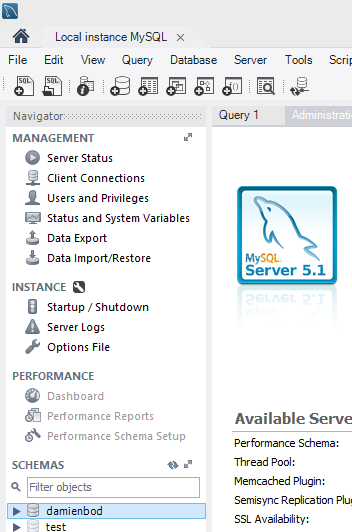
Now the database migrations can be created and the database can be updated.
1
2
3
4
5
| >> dotnet ef migrations add testMySql>> dotnet ef database update> |
If successful, the tables are created.

The MySQL provider can be used in a MVC 6 controller using construction injection.
1
2
3
4
5
6
7
8
9
10
11
12
13
14
15
16
17
18
19
20
21
22
23
24
25
26
27
28
29
30
31
32
33
34
35
36
37
38
39
40
41
42
43
44
45
46
47
48
49
50
51
52
53
54
55
56
| using System.Collections.Generic;using DomainModel;using DomainModel.Model;using Microsoft.AspNetCore.Mvc;using Newtonsoft.Json;namespace AspNet5MultipleProject.Controllers{ [Route("api/[controller]")] public class DataEventRecordsController : Controller { private readonly IDataAccessProvider _dataAccessProvider; public DataEventRecordsController(IDataAccessProvider dataAccessProvider) { _dataAccessProvider = dataAccessProvider; } [HttpGet] public IEnumerable { return _dataAccessProvider.GetDataEventRecords(); } [HttpGet] [Route("SourceInfos")] public IEnumerablebool withChildren) { return _dataAccessProvider.GetSourceInfos(withChildren); } [HttpGet("{id}")] public DataEventRecord Get(long id) { return _dataAccessProvider.GetDataEventRecord(id); } [HttpPost] public void Post([FromBody]DataEventRecord value) { _dataAccessProvider.AddDataEventRecord(value); } [HttpPut("{id}")] public void Put(long id, [FromBody]DataEventRecord value) { _dataAccessProvider.UpdateDataEventRecord(id, value); } [HttpDelete("{id}")] public void Delete(long id) { _dataAccessProvider.DeleteDataEventRecord(id); } }} |
The controller api can be called using Fiddler:
1
2
3
4
5
6
7
8
9
10
11
12
13
14
15
16
17
18
19
20
21
| POST http://localhost:5000/api/dataeventrecords HTTP/1.1User-Agent: FiddlerHost: localhost:5000Content-Length: 135Content-Type: application/json; { "DataEventRecordId":3, "Name":"Funny data", "Description":"yes", "Timestamp":"2015-12-27T08:31:35Z", "SourceInfo": { "SourceInfoId":0, "Name":"Beauty", "Description":"second Source", "Timestamp":"2015-12-23T08:31:35+01:00", "DataEventRecords":[] }, "SourceInfoId":0 } |
The data is added to the database as required.

Links:


No comments:
Post a Comment